Saturday, December 31, 2016

Google Chrome - What is the Extensions?

As I am software engineer, I used to work with Google Chrome on day to day basis. Recently I explained one of my client about Google Chrome extension and make him understand how to work with. This leads me to create this blog post as most of the audience do not know anything about extensions and how to use it.


What is Google Chrome Extensions?


Google chrome is not just browser that can be used to surf the internet but it also supports additional functionalities with Chrome Extension. Chrome Extension is like a plugins or installable programs which is installed in your chrome browser and you can open it with Google Chrome and use the functionalities with it.  It's like small programs that add new features to your browser and personalize your browsing experience. There is market place for it where you can find number extensions that you can install. Check the following link.

https://chrome.google.com/webstore/category/extensions


As you can see here there are number of extensions available here in various categories like, shopping, sports, productivity etc. You can use extensions for various purpose. For example


  • Check Live Cricket Score
  • Email Updates
  • Online Shopping
  • Price Comparison
  • Live and Breaking News
  • Picture Gallery


You can search for the required extension and install it your Google Chrome.


Once the extension is installed you can open it from Apps Menu in Mac OSX and from settings in Windows. Just click on the extension you want to open, and it will open it in separate window where you can use it. 

If you want to disable extension, you can delete it from settings - > Extensions.

Sunday, December 25, 2016

Online Shopping - Don't Just See the Website Name, It May Be Fraud

This blog is coming out of a conversation with my father on buying Smartphone online. Father was looking on WhatsApp messages in groups and there was a message of great deal of Redmi Note Phone.

The message was something like this.

Buy Redmi Note on Amazon - 95% off. Price : Only 500 Rs.

Now that is surely a great deal. Redmi Note is good smartphone and as per above message it selling on 95% off. And my father wanted to buy a Smartphone for me as I am using 8 years old Nokia Phone. Why I am using it is another story.

So curiously, father clicked on Link and it opened in browser and it shows decent Amazon website where all the specifications of the phone were displayed with discounted price and great reviews y customers and all. By looking at it anyone will be in impression that it's an Amazon website. So father called me and tell me about this deal and asked me to place order immediately.

I took his phone in my hand and see the deal but as I am aware about frauds like this. I checked the URL in browser and it looked something like this.

http://onlinesale23.smarthphone.com/redmi.html

Now that is suspicious. Why amazon will use this type of domains to sell the stuff. They have their own domain like www.amazon.in for India and www.amazon.com for world wide.

Then I explained father that it's a fraud. It's fake website and it's using layout and display like Amazon to trap the shoppers and steal their information.

All the online shoppers , please note that if you are looking at the great deals from Amazon, eBay or FlipKart or any major online shopping site, please check the link / URL in browser at a top.

These big brands have domains registered in their own name and that's the only genuine place to buy it. Most of the people who shops online remember the website with their colors and layouts and all and these frauds take an advantage of it and create their websites with these colors and layouts and also they use name of big brands like Amazon and then they circulate messages on WhatsApp or SMS or Emails where lots of people can fall on into this trap and place and order.

It may be possible that the order is placed but you will never get your items and also your information can be mis used.

So please don't fall into the TRAP.

Don't Just See the Website Name, Check Link / URL in Browser


Thursday, December 8, 2016

3 Major Challenges India Face in Going Cashless - DeMonetisatione

As we all know we are going through DeMonetisation phase where government has taken initiative to ban old notes and introduced new currency and during this phase, Government is peaching for cashless economy by encouraging people to use technology like e wallet, online banking, online shopping.

As an IT professional I really appreciate this move as this will surely benefit us in future. But for the time being there are some challenges we face for going cash less, in this blog I am going to explain what are those challenges and how we can overcome it.

1) Poor Internet Infrastructure and Internet Reach


This is the most common problem we face in India. Our Internet Infrastructure is poor till date. In may parts of the country there are no internet connections. In many part we still have to depend on Wireless connections, which are not reliable. And if there is a connection speed is very slow and not stable. Mobile Internet connections are also working slow. People are still using 2G connections in many part of area which is hard to use.

Take my example, I am leaving in Outer part of Ahmedabad and in my area there is still no reliable broadband connection. I am using wireless connections since last 3 to 4 years. 

To overcome this problem we must improve our internet infrastructure and make it available in all part of the country with decent speed that can be used without any difficulty. We must also increase mobile internet connections and spread it to all the areas.


2) IT Awareness, Awareness about Technology, IT Education


This is I think the biggest challenge we have. Most of the people don't know about technologies. They don't know about mobile / internet banking, online shopping, Paytm etc. Most of the people are also afraid of using technologies or use them in wrong way. That leads to other issues like fraud, cheating etc. 

For example, my cousin started using net banking but he saved username and password in draft SMS. Now that's the biggest mistake. If anyone see this, they can easily access it. This is the problem, people don't know about dangers of online technology.

  • They don't know what they should do and should not do while using technology.  
  • They don't know what can go wrong. 
  • They don't know what's the importance of strong password.
  • They don't know how to keep watch on their online activity.
  • They don't know what should do in case their accounts are hacked.
  • They don't know what is Paytm, what is Freecharge etc.
  • They don't know what information they should not keep on web.
To overcome this problem we must educate people about online technology, make them understand what are the benefits of it and what are the drawbacks, what security measures they have to take. 


3) IT Security


As I have mentioned in above that we need security measures to increase confidence in use of IT technology. There are lots of fraud happening in this. For example anyone calls you and claim that they are speaking from bank and ask about your confidential information and you don't know about it and give away your information and then you are doomed, in few minutes your account is empty. Same for online shopping, you order something and you never get it or get something else.

To prevent this and to increase confidence in online technology we must enforce IT security. We must have strict cyber laws to prevent frauds. Educate people about this so they don't get trapped in frauds. We must enforce this and gain use of technology.

Sunday, October 9, 2016

Split Pages from Big PDF File

Have you ever been into situation that you have a big PDF file. But you want to have only some pages of that. For example you have PDF file with 40 pages and you want to have only 10 to 15 pages or so you want first page only or last page only. How will you do that without any Acrobat software like Adobe Acrobat or Acrobat reader. In this blog I am going to explain that.

First of all open that PDF file on Google Chrome Browser. If you don not have Google Chrome, download it as it's required. If you have file stored in your computer, right click on it and open it with Google Chrome. If there is a remote file. Open it in new tab of Google Chrome. It should look something like this.


Do you see print icon on top right side, Check the above screenshot. That's the print icon. Click on that. It should bring following print popup.


If you have printer installed it will be selected by default as destination in left hand side. We don't want to print file. Click on Change button under destination and select "Save as PDF" option.


No in pages by default all will be selected. Instead of all pages, select other option bottom of it and give page range. 

For example if you want first page only. it should be.

1-1

If you want 5 to 10 pages, it should be.

5-10 etc.


Click on save and it will only save the pages you have mentioned. That's it and with this trick you can split PDF files with only required pages. Hope this helps you.

Tuesday, April 26, 2016

iMac, Macbook, Mac Mini - Can Not Shutdown Because Some Apps Are Not Closing

If you are Mac users you may have encountered that some times some applications refused to close and because of that you can not shut down your machine.

This is because these are called zombie processes stuck in some kind of dead lock and no matter what you do, it will not close. If you try quitting it or fore close it, it will not close. So how to over come this situation.

There is only one way to kill these application, and that is through command line. Here are the steps you have to follow.

1) Open Spotlight, Hit Command + Space

2) Type Terminal in it and hit enter.


3) This will open terminal window. Now type following command.

kill $(ps aux | grep 'Application' | awk '{print $2}')

Replace Application with name of application in above command. For example if OpenOffice is stuck then your command should be

kill $(ps aux | grep 'OpenOffice' | awk '{print $2}')

Replace Application with name of application in above command. For example if Xcode is stuck then your command should be

kill $(ps aux | grep 'Xcode' | awk '{print $2}')

This will kill that application and then you can easily shutdown your machine. Hope this helps you.

Monday, April 25, 2016

Not Sure What is Next In Your Schedule? Use This Hidden Feature of Google Calendar

In this blog I am going to explain one of the hidden and cool feature of Google Calendar. We all know Google Calendar is one of the best tool for your time management. You can schedule your appointments, meetings etc. in there and even it is integrated with gmail. How ever there is one cool feature of it and most of the users don't know about it. So in this blog I am going to explain this.

I have following meetings and tasks scheduled in Google Calendar for today.


After finishing some work I wanted to know what is next. So I have to go to google calendar and see my schedule. But then why to go to Google Calendar if you can get details directly in your Google Home page.

Go to Google Home page https://www.google.co.in/ Please note,  You must be logged into your google account. And type following in search box.

what am I supposed to do next?

and it will show your next meeting details from Google calendar from current time on words.


So, very simple, schedule everything in Google Calendar and ask Google to what you have to next and you will get all your answers. 

Sunday, April 24, 2016

Copy Paste Content Without Styling from Webpage to Word Document or Email

Hello,

In this blog I am going to explain the trick to copy paste content from webpage without styling.

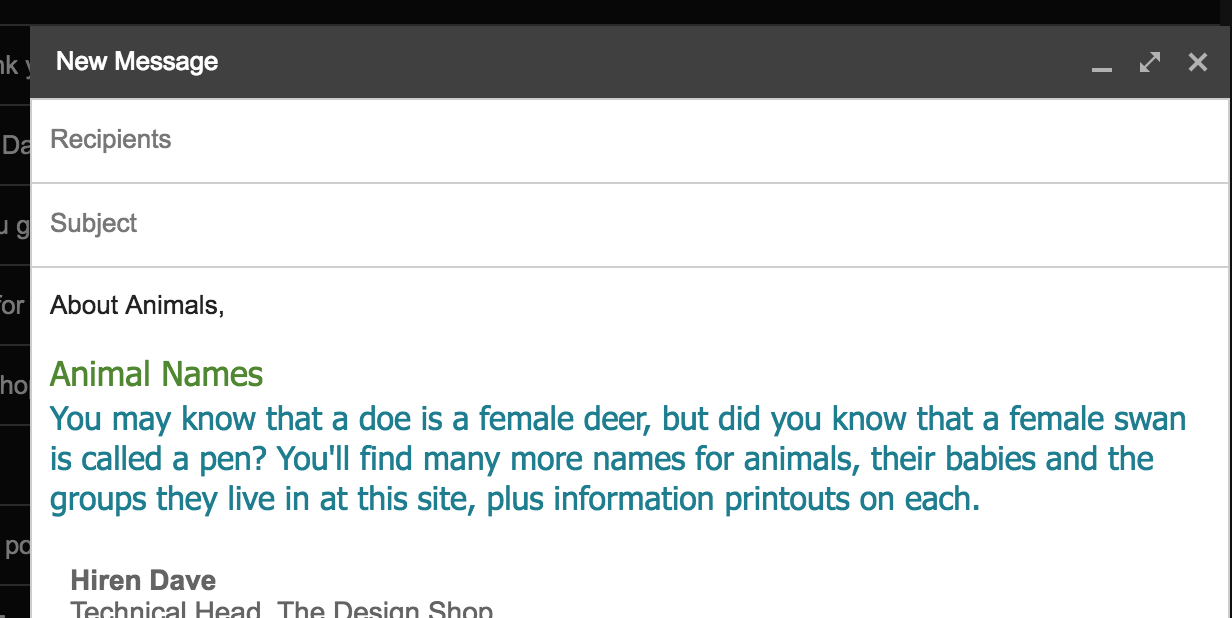
All of you may have faced this issue at one point of time in your life. Say you are drafting an email and you want to copy paste some content from webpage. When you copy and paste, the content will be pasted with all the styling. For example,  you are trying to copy following content from some web page.


When you copy and paste this in email or in word document, following happens.


So, as you can see the content is copied with all the styling colors and font etc. This will be painful for you sometime as you have to change font color and size and everything again in your email and word document. So how to overcome this. Very simple, first you copy and paste this content in Notepad if you are using windows machine or copy and paste it in TextEdit or TextWrangler if you are using Mac Machine. This type of applications does not support any formatting so all the styles and formatting will be lost. See example below.


Now copy paste this content from Text application to your email and word and see you will see it will be in plain text format.


Hope this helps you.

Saturday, January 30, 2016

Play Offline Game in Chrome - Endless T-Rex running game

When you are too much dependent on Internet for the work so forgot sometimes that your computer even works without internet. So what to do when network is down for some reasons and you don't have anything on your computer which you can use to pass the spare time and cut down the boredom.

Well, now you don't have to worry about it because Google takes care of it. You can play Endless T-Rex running game in Google chrome. Here what you have to do.

When you are not connected with internet. Open Google Chrome, open new tab and type any valid website address for example  www.google.com and it will show you following image.


Now you thought, it's just a some kind of graphics or emoticons displayed. Well it's not. Just click on T-Rex (Dinosaur) and hit space and T-Rex will jump and start running.  See the below image. 


So the game is all about clearing all the obstacles. So when an obstacle comes, hit the space and T-Rex will clear the obstacle. You can play it as long as possible till T-Rex struck with an obstacle. That's where the game is over.


But never mind, you can again hit space and new game will start. You can see current score and HI Score on top right side. 

Have fun...


Saturday, December 19, 2015

Undo mail Sending in Gmail

Have you ever faced a situation where you drafted an email in your Gmail account and clicked on send and suddenly you realized that you made some mistake in mail message or you missed something to attach and if receiver gets this email with problems, you will be in big trouble. That's the moment you will think that, I wish I can take that email back, it may be surprise for you but many of the Gmail users don't know that there is a such feature in Gmail where you can undo sending emails in 30 seconds. Here is what you have to do.

1) Go to your gmail account, and click on Gear icon on right side, it will show a menu, from that select settings.


2) In a General Tab there is a feature called Undo Send, there will be checkbox on left side. Which should be unchecked for you. Check it and select the cancellation period from the drop down. At max you can send 30 seconds.


3) Click on Save Changes at bottom of the page. And you are done. Now send an email to user and after sending you will see following message.


If you click on Undo, you message sending will be undone and you will get that message open in draft again, you can make your changes and save it again. I hope this helps you.


Friday, December 18, 2015

How to Book Confirm Tatkal Ticket on IRCTC Website

Hello,

I am very excited to start this new blog series. In this series I am going to share some tips and tricks I use on internet to make life easy. This trips and tricks comes from my own experience. I hope this will make your life easy.

In this first post I am going to explain some tricks to book confirm Tatkal ticket on IRCTC website. All the the readers from India will know about IRCTC. For the readers who are not from India. Here are some information on IRCTC. IRCTC is the website launched by Indian Railway. This gives facility to book tickets online. This website is splendid and it improved a lot since last few years. Million of tickets are booked through this website in every month and count is increasing each day.

Now we all know about Tatkal booking. Tatkal booking for any train will open 24 hours before the date of departure of train and there are limited seats and there is always a heavy rush for booking so you have to do something different to be ahead in rush. In this blog I am going to explain, what you can do.

First of all, for Tatkal bookings, there are different timings as of date (on 19 December 2015). Tatkal booking of all the AC classes starts at 10:00 AM , 24 hours before date of departure. So for example if a Train is running in Friday night. It's Tatkal booking will open on at 10:00 AM in morning on Thursday for all the AC classes and sleeper class bookings will start from 11:00 AM in morning. So here is what you can do to make sure that you get confirm tickets. Please note that using this tricks I was able to get confirm Tatkal tickets from Ahmedabad to Mumbai in peak season.

First of all here are some check lists, you should have or be prepared.

1) Make sure you have good internet connection. I suggest minimum 2 MBPS broadband connection. Do not depend on wireless connection or dongles. It may fail in between.

2) Keep your credit cards, debit cards, net banking details with you. Do not search or remember it at end moment.

3) Keep your mobile with you as you may have to enter OTP if you are using credit card or net bankings.

4) Be very firm about train selection. Select one train in advance. For example there are at least 10 to 15 trains between Ahmedabad to Mumbai. From that you have to choose one train in which you want tickets. There is no time for search or checking weather the seats are available or not. Because meanwhile you search and choose, all the seats are booked.

5) Be ready with your list of passengers and their required details. At end moment do not ask what's your age? or what's your full name? etc. Be ready with that.

Ok, so now you have all the things required let's go for it. First of all open the IRCTC website five minutes before the booking. So if you are booking for AC classes open it at 09:55 AM and for sleeper open it at 10:55 AM. So check your time and login. Ohh but wait, you can be depend on time displayed by your computer or clock. Because it may not be displaying proper time. It may be here and there for couple of minutes. This types of website works on the IST  (Indian Standard Time) and not your computer time or clock time. So to know timings. Go to following website and see the correct time and keep it open.

http://www.timeanddate.com/time/zones/ist


Login to IRCTC and search your trains, select the train and select the class and select Tatkal in quota.


You will see above list. When you click on quota so will see following.


As you can see above, it will show you number of seats available for Tatkal booking. But there will not be any book now button because booking is not yet open. So what to do, sit back and relax and wait till its open? Nooooo, you can not sit back and relax. Because in websites like IRCTC, there is a user session, if you do not do any activities for some time in website, your session will be expired and you will be logged out. So you have to login again and search again and meanwhile all the seats are gone. So you have to do some activities. As you can see in above image there is a refresh button. That will refresh the seat availability. Keep refreshing it every 30 seconds and keep watching time in IST clock. Sometimes what I observed is refresh button is not available so what do. In this case you can keep clicking on class in train list, it will refresh the seat availability.


 Do not refresh it every second as sometimes it will log out with error.

Keep checking IST click till it's 10:00 or 11:00.


It's the time now. Go for the booking. Refresh it one more time and Book Now button will be available.


Click on Book Now and go.... First screen will be passenger information. Fill it out as quickly as possible. Do not waste time in identifying captcha if it's not readable properly. Just refresh captcha and get the new one. Because if captcha is wrong, it will take time to reload the page and show the error. 

Quickly select your payment methods and go on payment site and pay. I am sure you will get confirm tickets, if you use this simple tricks suggested here. 

Let me know if this was helpful to you.